
The Smartest Way to Pay: All You Need to Know About Digital Wallets
Key Takeaways
Digital wallets (Apple Pay, Google Wallet, Samsung Wallet) store your CSCU debit and credit card information securely on your phone, so you can tap to pay anywhere Visa is accepted, without carrying a physical card.
Digital wallets are more secure than physical wallets. Your real card number is never shared with merchants as they use a one-time encrypted token for every transaction instead.
P2P apps like Venmo and Cash App are not the same as digital wallets because any balance sitting in those apps is uninsured. Keep your money in your CSCU account and use Zelle (built into the CSCU Mobile App) to send funds safely.
Setup takes less than two minutes. When enrolled, the CSCU debit card earns uChoose Rewards by earning points on every tap-to-pay purchase.
We’ve all had this happen to us. You’re in a checkout line, or at the register, digging through your pockets or purse to find a debit card, credit card, or cash, only to find that you’ve left them at home or in the car. Sometimes you’re shuffling through the cards in your wallet, trying to find the right one.
You may have also seen people breeze through a checkout line by just tapping their phone or smartwatch to a card reader. It’s fast, convenient, and they never have to worry about carrying the right cards or cash. Digital wallets, also known as mobile wallets, are quickly replacing bulky wallets and purses.
Smartphones already serve as our cameras, maps, and calendars, so why not our wallets as well? They’re not just convenient, they’re also our most secure way to pay. Setting up a digital wallet with a CSCU debit card is incredibly easy, highly secure, and takes less than two minutes.
More than 5.2 billion people are expected to use digital wallets this year, according to SQ Magazine, which represents more than 60% of the world’s population. The report said digital wallets account for around 83% of global digital payment volume, and 35% of online transactions are processed using mobile wallets in major global markets.

What Exactly is a Digital Wallet?
A digital wallet is an app on your smartphone, smartwatch, computer, and similar devices that securely store the payment information from your physical debit card, credit cards, and any loyalty cards you may have. Digital wallets are already built into the platforms on electronic devices that many of us already use, such as Apple Pay (for iPhones), Google Pay (for Android devices), and Samsung Pay.
How to Use Apple Pay, Google Pay, and Samsung Pay
A digital wallet stores your debit card and credit card information in computer code and can be used anywhere you see the “tap to pay” Wi-Fi-looking symbol at checkout counters, gas pumps, or a local Huntsville coffee shop. Instead of tapping a debit card or credit card on the payment terminal, just open your digital wallet, choose which card you’d like to use, and tap your device to the payment symbol.
You can also use it when shopping online. When you reach the payment screen, instead of entering your debit card or credit card information manually, just look for the digital wallet option and select the one you use, such as Apple Pay, Google Wallet, or Samsung Pay. Then follow the instructions to approve the payment on your device. You can also use a digital wallet to give funds to friends and family members. Depending on the type of digital wallet you use, this would either be by sending them a text message or tapping your phones together.

Are Digital Wallets Safe?
Yes, digital wallets are safe. In fact, when it comes to digital wallets vs physical wallets, a digital wallet is far more secure. When you use a digital wallet to make a payment, it doesn’t send your actual CSCU debit card or credit card number to the merchant. Your digital wallet creates a unique, one-time “token” which is a bit of randomized code that can only be used once, for that specific transaction. It also uses data encryption, which makes it nearly impossible for someone to intercept and misuse the information. If the store’s payment system ever gets hacked, your card number won’t be there to be stolen.
You can also have a couple of layers of security for your digital wallet. Using a password, PIN, or biometrics (your face or fingerprint) to access your digital wallet can make it difficult for someone to misuse your digital wallet if your phone or smartwatch were stolen. Using a different password or PIN on your phone itself would add an extra layer of security.
If your physical wallet is lost or stolen, a thief would have immediate access to its contents. Someone could rack up a significant amount of charges or cash withdrawals before you could deactivate your cards and report them missing. If it takes a while for you to realize your wallet is missing, that gives a thief even more time to spend your money. Of course, any cash in your wallet would be lost as well.
The CSCU Advantage: Local Trust with Innovation
With CSCU, you get the global convenience of using digital wallets such as Apple, Google, and Samsung Pay while keeping your money securely managed by the local credit union you trust. You can also keep earning uChoose Rewards points if you link your CSCU Visa Rewards Credit Card or Debit Card to your digital wallet and select these cards as your choice of payment. You can load both your CSCU checking account debit card and your CSCU credit card into the same app and seamlessly toggle between them at the register.
The "Venmo Trap:" Where NOT to Keep Your Money
Many of our members use both a digital wallet and a third-party payment app, such as Venmo, PayPal, or Cash App, to send and store money with friends and family members. If you have a digital wallet and a P2P app on your phone, remember that even though they work in similar ways, they’re not the same in terms of financial security.
Any funds you have sitting in your “balance” in a Venmo or Cash App account is not federally insured by the National Credit Union Administration (NCUA). If the app freezes your account or gets hacked your money could disappear, and trying to get help through their customer service is known to be difficult.
These third-party P2P apps are also prime targets for scammers who may try to hack into your account. They might do it online or by pretending to be from customer service and trick you into giving them access to your accounts.
That’s why we advise our members to never carry a balance on any P2P app. Instead, we recommend using the Zelle P2P system that’s built directly into our CSCU mobile banking app. When it comes to Zelle vs Venmo safety, there’s no comparison. With Zelle, your money stays safely inside your NCUA-insured and protected CSCU account until you send funds to a friend or family member.
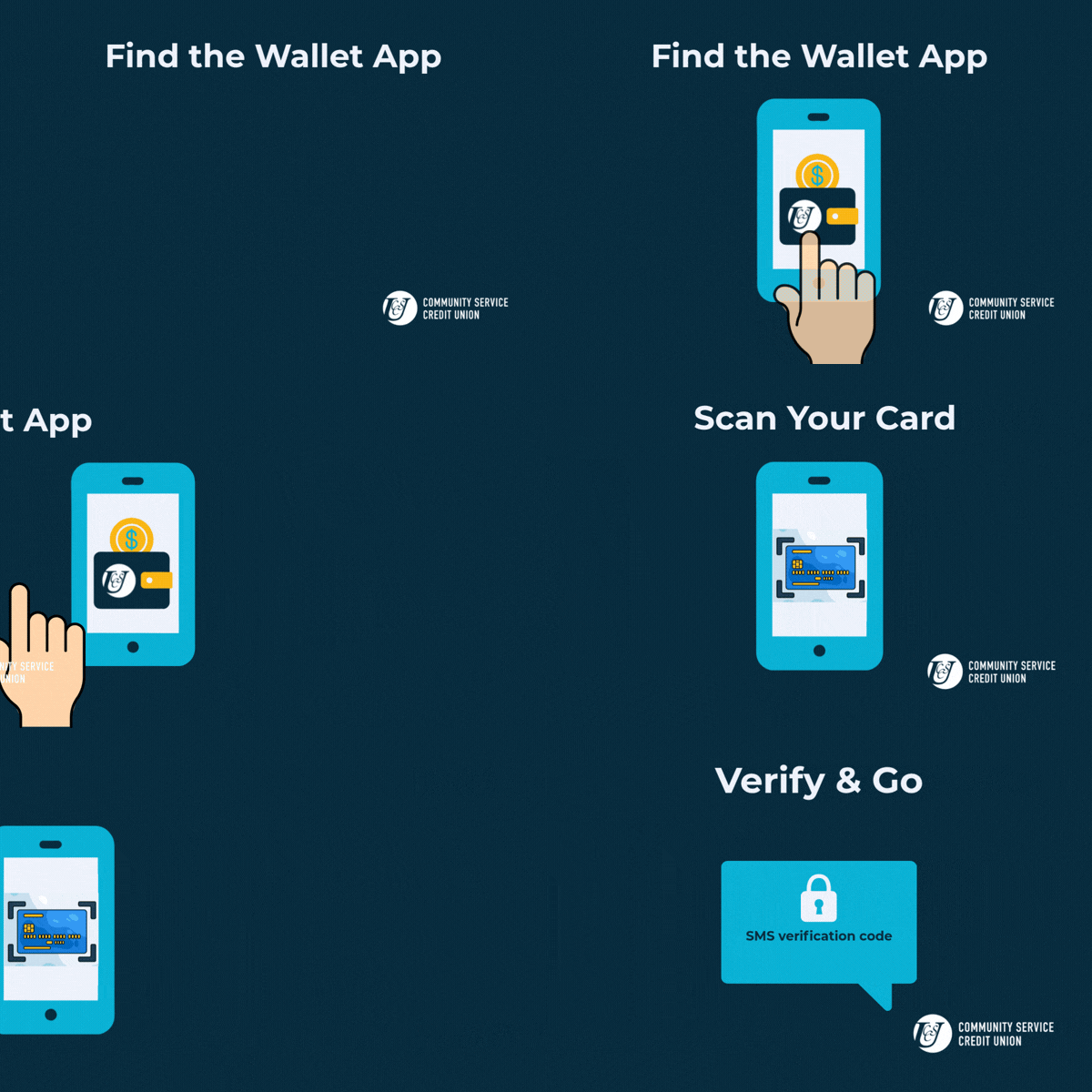
How to Set Up Your Digital Wallet
Before you can use a digital wallet, you’ll first have to set it up. There are three ways to add your CSCU card:
Tap your physical card to your phone. Your CSCU debit card has tap built in. Just hold it to the back of your phone and follow the prompts — your phone will detect the card automatically.
Use the CSCU Mobile App. Open the CSCU Mobile App, go to the Cards section, and tap “Add to Wallet.” This pushes your card directly to your phone’s wallet app in a few taps.
Add your card manually in the wallet app. Open your phone’s built-in wallet app (the Wallet app on iPhone, Google Wallet on Android, or Samsung Wallet on Samsung phones) and enter your card number or scan it with your camera. Step-by-step instructions for each are below.
How to Add the CSCU Debit Card to Apple Pay
Step 1: Find and open the Wallet app on your iPhone. (This is Apple’s built-in Wallet app — not the CSCU Mobile App.)
Step 2: In the Wallet app, tap the plus sign (+) in the top-right corner, then select “Debit or Credit Card.” Either enter your card’s information manually or use your phone’s camera to scan the front and back of your card.
Step 3: Accept the terms and conditions.
Step 4: Complete the verification steps, which typically involve a one-time code you receive via text and enter it into the app.
How to Add a CSCU Debit Card to Google Wallet
Step 1: Find and open the Google Wallet app; it should already be installed on your Android phone. If not, download and install it from the Google Play Store.
Step 2: Tap “add to wallet,” then “payment card,” and a new debit or credit card.
Step 3: Enter your card information manually or scan the front and back of your card with your phone’s camera.
Step 4: Follow the prompts and accept the terms.
Step 5: Choose a verification option and enter the code you receive (usually by text).
How to Add a Credit Union Card to Your Samsung Wallet
Step 1: Find the Samsung Wallet app on your Samsung phone. You may be asked to verify yourself via the Samsung account that’s connected to your phone.
Step 2: Select “add card,” and scan the front and back of your card with your camera or enter the information manually.
Step 3: Tap “next,” and wait for the app to verify your card.
Step 4: Accept the terms and conditions.
Step 5: Follow the prompts to verify yourself.
Manage Your Cards in the CSCU Mobile App
Once your cards are in your digital wallet, pair them with the CSCU Mobile App for an extra layer of control. From the app, you can turn your debit card on or off, set spending limits by amount or merchant type, get real-time transaction alerts, and access your full transaction history—all from your smartphone, 24/7. It’s the kind of control that gives you peace of mind whether you’re spending money locally in Huntsville or on the road across Texas.
Your Next Steps as a CSCU Member
Switching to a digital wallet takes less than two minutes, costs nothing, and makes your everyday spending faster and more secure. Here’s how to get started:
Add your CSCU debit card or Visa Rewards Credit Card to Apple Pay, Google Wallet, or Samsung Wallet using the steps above.
Download the CSCU Mobile App to manage your cards, set alerts, and monitor transactions in real time.
If your CSCU debit card is enrolled in uChoose Rewards, make sure to select it as your payment method to keep earning points on every tap.
Move any money sitting in third-party apps like Venmo or Cash App back into your CSCU account, where it’s NCUA-insured.
If you need help adding your CSCU debit or Visa credit card to your phone’s wallet app, stop by our Main Branch or South Branch, and our local team will be happy to walk you through it!